Platform
How an agent action actually gets governed.
This is the runtime path inside Guardyx AI — how a tool call moves from interception to execution, with every decision captured. It's the part your engineers will care about.
Read the developer docsThe runtime path
Intercept
Route every tool call through Guardyx AI before it executes.
Evaluate
Run policies using context like user, tool, payload, and risk.
Approve
Require human approval for sensitive actions.
Trace
Capture inputs, decisions, and outcomes for every run.
Execute
Perform the action only after policies and approvals pass.
Replay
Coming soonRe-run scenarios to debug behavior and validate guardrails.
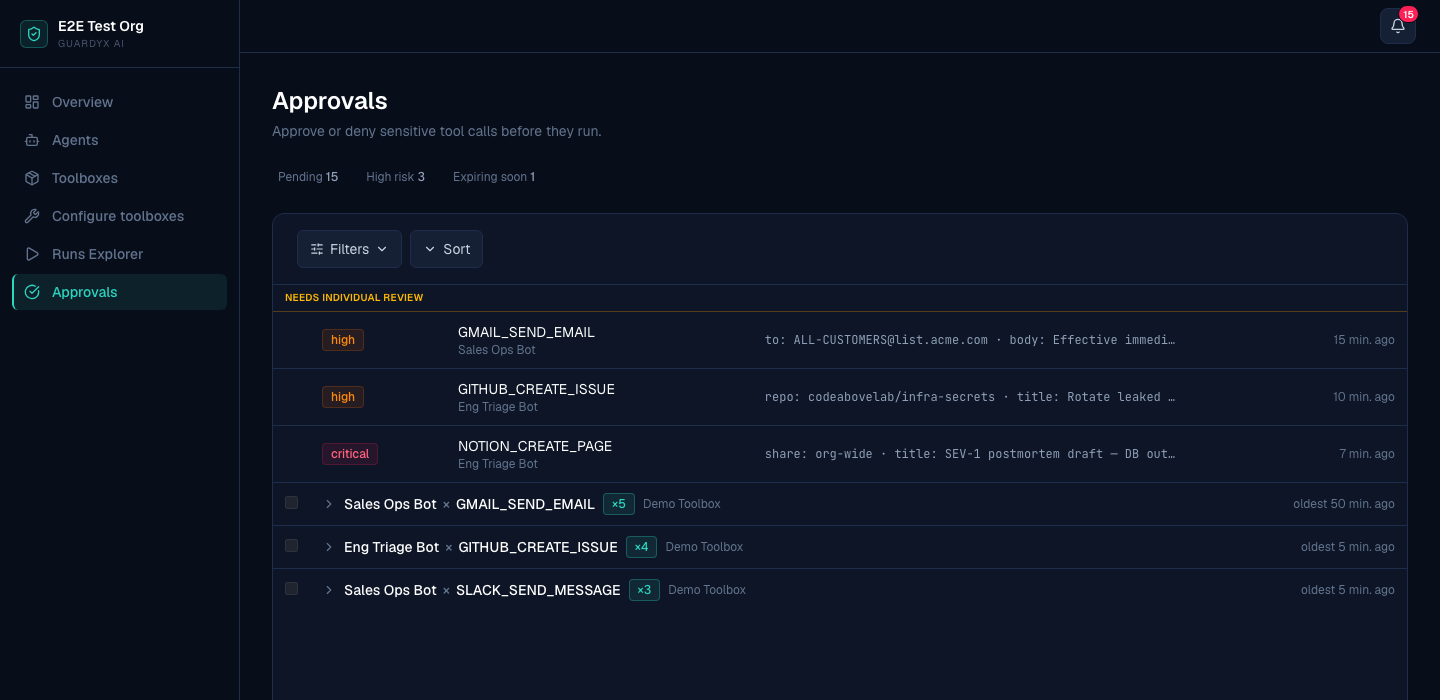
The surface your team operates.
Every held action lands here: what the agent tried, how risky it is, and the approve-or-deny call — before anything runs.
A worked example
One high-value payment, from the agent's decision to the recorded outcome.
Execution flow
Without Guardyx AI
This sequence executes immediately — no policy checks, no approvals, no audit trail. You'd also need to build and maintain the control infrastructure yourself.
Agent decides to initiate a $250,000 vendor payment.
Call is routed through Guardyx AI instead of directly executing.
Policy check runs and flags the transaction as high-risk.
Execution is blocked and routed for finance approval.
Finance approver reviews details and approves the payment.
Payment executes and a full audit trail is recorded.
Execution log
blockedrun_id: 9f3c2a1 agent: sales-agent tool: salesforce.update_opportunity status: blocked reason: requires_approval policy: external_write_requires_review
Fail-closed by default
If the policy check itself cannot complete — the policy service is unreachable, times out, or errors — the action does not run. The default outcome of an unresolved check is to stop the action, never to let it through.
What you get
Skip building it yourself
Keep your existing agents and route their actions through Guardyx AI — instead of building approval, audit, and policy infrastructure from scratch.
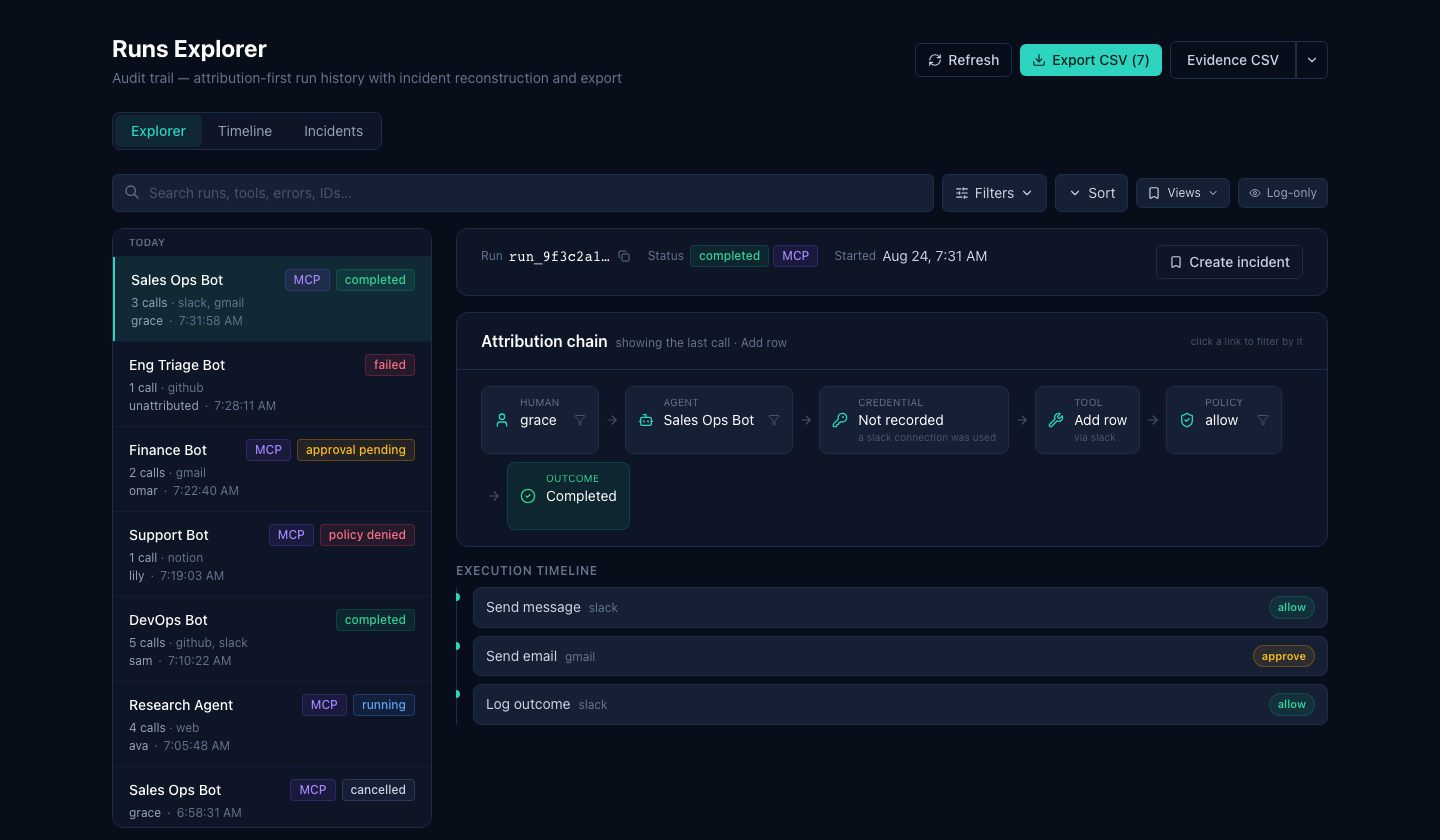
Every run, on the record.
The Runs Explorer keeps an attribution-first history — who kicked off each run, which tools it called, the policy decision, and the outcome — exportable as evidence.
Connect your agents two ways — no rewrite either way.
Point a client at Guardyx AI (MCP)
Already using Claude Desktop, Cursor, or a custom client for the Model Context Protocol (MCP)? Point it at a Guardyx AI endpoint. Guardyx AI then governs every tool call it makes, applying policy, approvals, and audit automatically. Setup is a config change, not a migration.
Add the Guardyx AI endpoint to your client config:
{
  "mcpServers": {
    "guardyx": {
      "command": "npx",
      "args": [
        "-y", "mcp-remote",
        "https://your-guardyx-host/v1/mcp",
        "--header", "X-API-Key:gx_live_YOUR_KEY"
      ]
    }
  }
}Wrap your own agent
Running a custom Python agent, or a framework we don't ship a native adapter for? Route its tool calls through the Guardyx AI SDK and get the same controls around code you already have.
SDK (custom Python):
# before
tool.send_email(payload)

# after
guardyx.execute("send_email", payload)
Native adapters, live today
These are the frameworks Guardyx AI ships an adapter for right now. LangChain tools are governed through the LangGraph adapter. Anything else connects through MCP or the SDK.
- CrewAI
- Microsoft AutoGen
- Google ADK
- OpenAI Agents SDK
- Anthropic Claude Agent SDK
- LangGraph
- OpenAI tool calling (raw)
What comes out the other end
Every governed action — allowed, held, or denied — is captured with its context and decision.
Auditor-ready evidence packs
Export the record of what your agents did and what Guardyx AI decided, as a pack an auditor can read — rather than a questionnaire response you assemble by hand. Every pack carries an embedded verification of the audit chain.
No SIEM integration today
We don't currently stream into a security information and event management (SIEM) tool or an observability platform. We'd rather say so than imply otherwise. Audit leaves Guardyx AI as an export you control.
Every AI action passes through Guardyx.
Point your existing agents at Guardyx AI and see it work.
Connect over MCP or the SDK and route your first governed tool call without rewriting your agents.